

Accessibility
Accessibility checks your careers site against WCAG 2.1 AA — the job board, your published landing pages, and a sample of live jobs — and tells you what to fix and where.
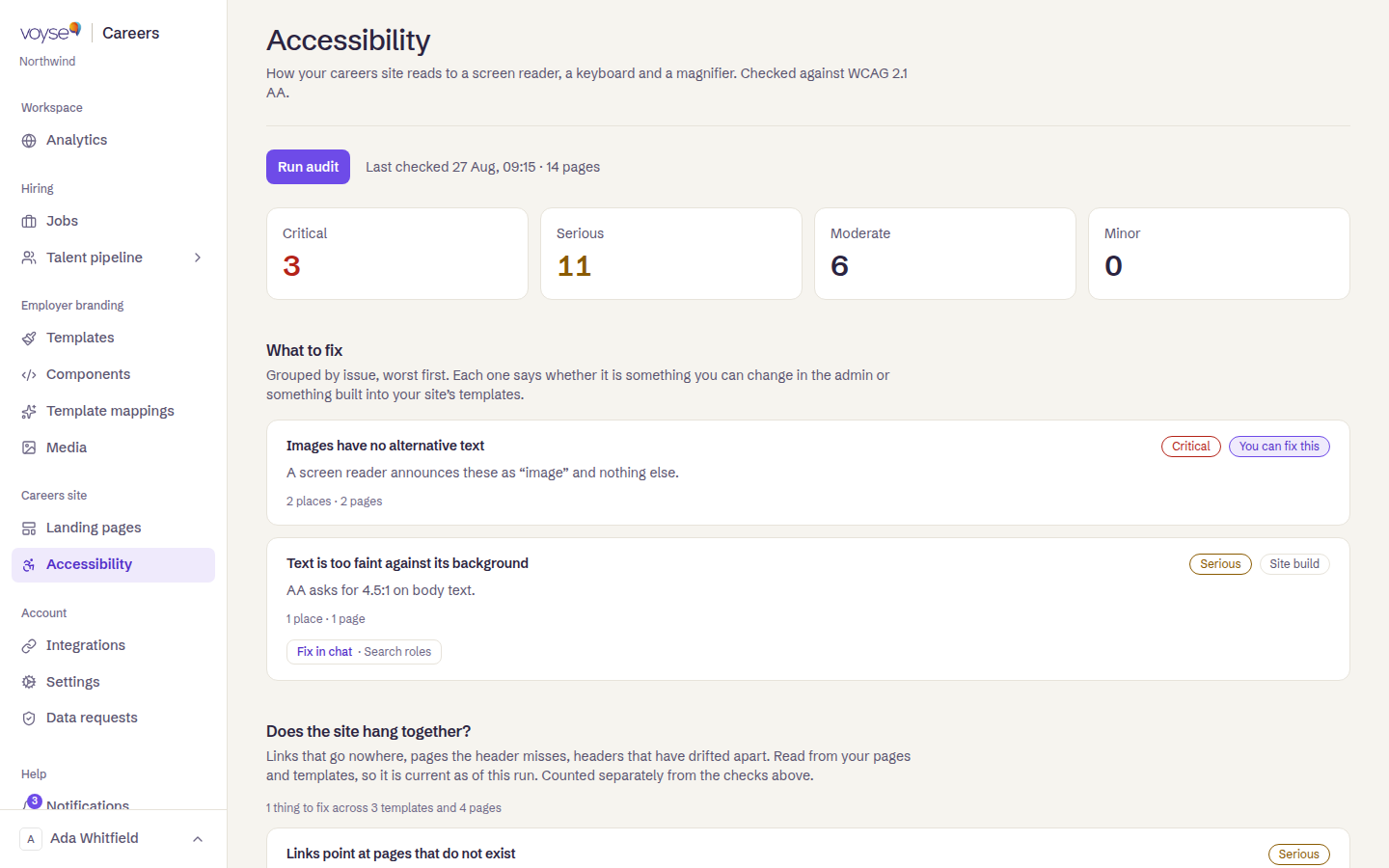
Run an audit
- Select Run audit. It runs in a real browser and takes about a minute — you can leave the page; the result is there when you come back.
- When it finishes, the counts and findings below update to the new run.
If a run doesn't finish, the page says so and you can start another; nothing from the previous run is kept.
Reading the results
Findings are grouped by issue and counted by severity — Critical, Serious, Moderate, Minor — worst first. Each one names how many places it appears and how many pages that spans, and says whether it's something you can fix yourself or something built into your site's templates. Where it names a template section, a Fix in chat link opens that template's editor with the section selected and the fix already described — see Templates.
Two further sections:
- Does the site hang together? — links that go nowhere, pages your header doesn't reach, headers that have drifted apart between templates.
- How fast it loads — how long the slowest page took to show its main content, and what's making a page slow where one is.
What an audit can't tell you
A clean result is a good sign, not a conformance claim. Automated testing finds between a third and a half of WCAG issues — it can't tell you whether alt text is accurate, whether a caption matches its audio, or whether the site can be operated by keyboard from end to end.